
Attackers used stolen credentials to log in an average of eight minutes after infection across 27 confirmed infostealer cases, according to a report from Elastic Security Threat Command. Researchers also documented misuse of AI applications to execute commands and digitally signed remote monitoring tools to maintain access.
“An agent that holds credentials and can reach the internet is a new attack surface, whether it’s misconfigured or abused. When an attacker is behind it, its activity looks exactly like the employee who installed it. So the question for defenders isn’t whether a tool is approved; it’s what that tool is actually doing,” said Mike Nichols, General Manage, Security at Elastic.
Attackers run commands through AI applications
Coding assistants such as Claude Code and Cursor can execute system commands. Their ability to work with files, credentials, and other applications gives attackers ways to act through software installed for everyday work.
Researchers documented intrusions involving Claude Code on Windows and the ChatGPT desktop application on macOS.
In the Windows case, an attacker connected remotely to a computer and used Claude Code through its Visual Studio Code extension to prepare tools and reach an outside server through a concealed connection.
On macOS, commands run through the ChatGPT desktop application read an internal infrastructure document and then accessed the user’s saved password store.
These cases involved misuse after attackers obtained access. They do not establish that the applications contained a vulnerability or that their providers were compromised.
Stolen credentials used within minutes
Infostealers collect information such as saved passwords, browser session data, and payment details.
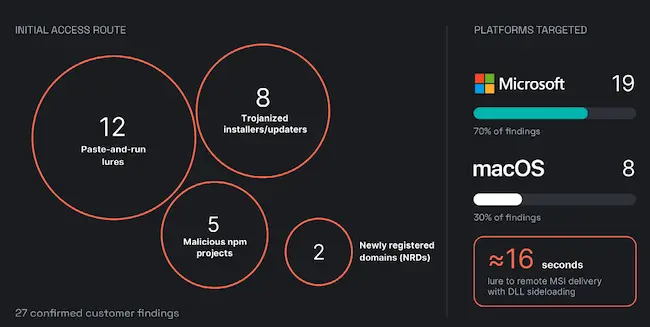
Confirmed infostealer findings by initial access route and platform (Source: Elastic)
Across 27 confirmed cases on customer computers, investigators observed theft operating through applications the user or operating system already trusted. These included a signed remote monitoring agent, a browser updater, a vendor installer, and Apple’s scripting utilities.
ClickFix-style verification pages were the most common entry point, appearing in 12 cases. These pages persuade people to copy and run a malicious command, often presented as a verification step or troubleshooting instruction.
The approach can bypass defenses focused on scanning email attachments because the user executes the command themselves.
In one healthcare case, delivery of a malicious installer and execution through DLL sideloading occurred about 16 seconds after the user followed the lure. DLL sideloading causes an application to load malicious code.
Captured session data can also allow attackers to use an account without entering its password again.
Remote IT tools provide continued access
Remote monitoring and management software lets IT staff connect to computers, transfer files, and run commands. Attackers can use those capabilities to control a device and deliver additional tools or malware.
Researchers confirmed 23 cases involving abuse of these applications. Phishing pages and archives containing malicious scripts led to installations, with ScreenConnect named most often.
One campaign began with a fake digital invitation and led to a hidden installation of ScreenConnect. The application connected to an attacker-controlled server and ran as a Windows service.
Another case involved an attacker uploading remote access software to a compromised server after attempts to create user accounts failed.
Phishing exploits trusted sign-in services
Attackers used trusted authentication services and preapproved applications to access cloud accounts.
Adversary-in-the-middle (AiTM) phishing kits place a relay between the victim and the real login page. When the victim enters credentials and completes multifactor authentication, the attacker can capture the resulting authenticated session.
Tycoon 2FA was one of the kits discussed and remained in active use during the reporting period.
Investigators observed attackers submitting stolen usernames and passwords through an older authentication method that allowed access without a second factor in those cases.
A separate device-code phishing case persuaded a user to enter a code on Microsoft’s sign-in page. The approval granted access to a session initiated by the attacker. Subsequent activity included registering a virtual device to support continued access.
“When attackers operate inside trusted software or on behalf of trusted users, the defensive answer is rarely just deploying a new signature. Detecting and neutralizing these threats requires user and entity behavior analytics (UEBA) to baseline normal activity, alongside cross-domain visibility and active correlation across your security environment,” the authors explained.
from Help Net Security https://ift.tt/Wl5OtHC


0 comments:
Post a Comment