Thursday, July 31, 2025

Google Is Rolling Out Its AI Age Verification to More Services, and I’m Skeptical

Yesterday, I wrote about how YouTube is now using AI to guess your age. The idea is this: Rather than rely on the age attached to your account, YouTube analyzes your activity on its platform, and makes a determination based on how your activity corresponds to others users. If the AI thinks you're an adult, you can continue on; if it thinks your behavior aligns with that of a teenage user, it'll put restrictions and protections on your account.

Now, Google is expanding its AI age verification tools beyond just its video streaming platform, to other Google products as well. As with YouTube, Google is trialing this initial rollout with a small pool of users, and based on its results, will expand the test to more users down the line. But over the next few weeks, your Google Account may be subject to this new AI, whose only goal is to estimate how old you are.

That AI is trained to look for patterns of behavior across Google products associated with users under the age of 18. That includes the categories of information you might be searching for, or the types of videos you watch on YouTube. Google's a little cagey on the details, but suffice it to say that the AI is likely snooping through most, if not all, of what you use Google and its products for.

Restrictions and protections on teen Google accounts

We do know some of the restrictions and protections Google plans to implement when it detects a user is under 18 years old. As I reported yesterday, that involves turning on YouTube's Digital Wellbeing tools, such as reminders to stop watching videos, and, if it's late, encouragements to go to bed. YouTube will also limit repetitive views of certain types of content.

In addition to these changes to YouTube, you'll also find you can no longer access Timeline in Maps. Timeline saves your Google Maps history, so you can effectively travel back through time and see where you've been. It's a cool feature, but Google restricts access to users 18 years of age or older. So, if the AI detects you're underage, no Timeline for you.

You'll also notice your ads will be much less relevant to your interests and search history. Accounts under 18 don't have personalized advertising, which is a great choice for all of us—not just teens. Sure, it's good to limit targeted advertising toward younger people, but, as an adult, I certainly don't need to see the fruits of web trackers' labor manifest as pop-up ads. I try to disable personalized ads whenever I can anyway—but an ad blocker solves the problem entirely.

Finally, accounts under 18 won't be able to access apps restricted to adults on the Play Store, which makes sense. If your account is flagged as being under 18, you won't be able to download or access 18+ apps.

If Google's AI gets it wrong, it's on you

Part of the problem with outsourcing this type of work to AI is that the tech is not perfect. As a matter of fact, it often makes mistakes, and will undoubtedly label some adults' accounts as underage. While the above restrictions aren't particularly extreme, you probably don't want to deal with YouTube's encouragements to go to sleep, or arbitrarily losing out on features like Timeline.

Google is aware of this possibility, and has a solution: If the AI gets it wrong, you can verify your age by uploading either your government ID or a selfie. The latter likely uses a different AI model to determine whether you really are over 18, which has its own set of problems, but the point is this: Google is following an age verification trend started by other sites and services in the face of new laws from various governments. Age verification is slowly becoming the norm, demanding users upload official IDs to prove they are as old as they say they are.

I'm all for protecting kids online, but I'd argue that there should be ways to do it that don't involve sacrificing the privacy of every user on the web.


from Lifehacker https://ift.tt/VmMgvAZ

The Pixel 8 Pro Is Nearly 50% Off, and It Comes With a Free Pixel Watch 2

We may earn a commission from links on this page. Deal pricing and availability subject to change after time of publication.

Google has officially announced the Google Pixel 10 lineup set to be released in August, along with the Pixel Watch 4, so it makes sense they're trying to get rid of their older models' inventory at discounts. Right now, they are offering the Pixel 8 Pro for $599.99 (originally $999.99), alongside the Pixel Watch 2 (199.99) and the official Pixel 8 Pro case ($34.99), both for free. It's a worthwhile deal if you're looking to get a Pro phone on a budget or kickstart the journey into the Google ecosystem.

You'll get about nine hours of battery life from the Pixel 8 Pro; a 50MP, 48MP, 48MP rear camera; and a 10.5MP front-facing camera. The OLED screen is 6.7 inches with a 2,992 by 1,344-pixel resolution and 120Hz refresh rate. The peak brightness hits 2,400 nits. You can read about it in more detail on our Pixel 8 Pro review.

The Pixel 8 Pro is still a great phone in 2025, with support for tons of AI features that make the phone feel fresh even a year after its release. Google has also been working hard to patch up the vulnerabilities on their Pixel phones as far back as the Pixel 6, meaning the Pixel 8 Pro will be supported with software updates for a while (as long as seven years). Google also keeps dropping new Pixel features every few months, including the “Audio Magic Eraser,” which gets rid of distracting sounds in videos, and the “Best Take” feature, which lets you pick the best shot from a series of photos.

The Pixel Watch 2 offers 33 hours of battery time, a Qualcomm 5100 processor, a bright AMOLED screen, and a multitude of features, including an accelerometer, GPS, a blood oxygen monitor, a temperature sensor, and others. The smartwatch is rated IP68 for dust and water resistance (you can submerge it up to 164 feet underwater). You can read about it in more detail in our review.


from Lifehacker https://ift.tt/vEbCzZi

Three Things I Liked About Garmin's Sleep Band, After My First Night

We may earn a commission from links on this page.

I woke up this morning from my first night with Garmin’s Index sleep band, and so far it’s exactly what I hoped for—super comfortable, and requires no thought to use. You just put it on when you go to bed, and everything is taken care of. I’m not yet convinced it's worth $170, however. (I’m working on a full review of this device, and I'll compare it to its rivals from Whoop and Amazfit.) 

You don’t have to mess with the app to make it work

All I had to do was pair it, and set my smart alarm in the app, then set it aside until bedtime. (Yep, I’m trying out the smart alarm—hoping that it works better for me than the smart alarm on the Vivoactive 6.)

Best of all, you don’t need your phone to snooze the alarm in the morning, or even to turn it off. When the gentle buzzes woke me up, I reached over and slapped my arm. Nothing. So I knocked on the device twice, and that was the charm. It gave a little double buzz of acknowledgement, and let me sleep a few more minutes. 

On phone alarms, I’m always mixing up the “stop” and “snooze” buttons in my grogginess. I wondered what I was supposed to do here when I wanted to fully turn off the alarm. Eventually I realized the answer is simpler than I thought: You just take the band off, and it knows you’re awake.

It’s ridiculously comfortable

I don’t know how well the band is going to wear over time—it’s thin and wide, and I worry about whether it might fray or pill. But as I got into bed, I appreciated that it wasn’t made of watchband-style elastic. (I’ve worn Whoop’s bicep band to bed many times, and it’s fine, but this is better.)

The strap is 2.5 inches wide, and has soft Velcro stripes all the way down its length. (I was between sizes, and got the small/medium band; it fits well.) The fabric is stretchy. So it doesn’t put pressure on any one part of your arm, and doesn’t have edges that dig in.

The alarm’s vibration is gentle

This is probably both a plus and a minus. The vibration level was set by default to the highest of three levels. When it buzzed to wake me up, there were cycles of four buzzes: light, medium, harder, harder, then starting over again with the light one. This let me respond to the lighter buzz when I first felt it, if I was sleeping lightly, but definitely woke me up just fine if I slept through that part. 

And, yes, I tested this through many several snooze cycles in one morning. For science.

What I’m still curious about

My biggest question about this device is whether the smart alarm will actually work. I have my doubts based on my experience with the Vivoactive 6, the first Garmin to feature a smart alarm. Every night I was testing that watch, I’d set a wake-up window of 7:00 to 7:30 a.m., and every morning I’d be woken up at 7:30 on the dot. 

I also want to see how the band stands up to wear and tear. It’s machine washable, they say. Extra bands cost $49.99, so they better last. I don’t pay much attention to reviewing the bands on most devices, since you can usually pick up a nicer watch band for $10-20 if you don’t like the one your watch came with. But when there’s only one option out there, it better be good.


from Lifehacker https://ift.tt/9j8AIh6

Wednesday, July 30, 2025

The Nespresso Vertuo Pop+ Just Reached Its Lowest Price Ever

We may earn a commission from links on this page. Deal pricing and availability subject to change after time of publication.

Right now, the Nespresso Vertuo Pop+ is 32% off, bringing its price to $89 (originally $130), an all-time low, according to price trackers. As a longtime Nespresso Vertuo fan who starts every morning with a creamy latte, I’ve found this machine to be consistent, reliable, and well-built. While the pods can be a bit pricey, they’re still more cost-effective than daily trips to a coffee shop. If you’re considering a new single-serve pod coffee maker, this is a great little machine.

While the Vertuo Pop+ isn’t as versatile as a Keurig (which can make teas and hot chocolate), it offers plenty of range for those who prefer espresso-based beverages. It supports up to five cup sizes and includes several smart features.

The machine automatically detects the correct drink size based on the pod inserted, and it scans a barcode to change the way it brews various beverages. Bluetooth and wifi connectivity enable automatic software updates. Another perk of the Nespresso Vertuo is the prominent, crema-like layer of foam, which the Keurig models don’t typically produce as well. 

Quality packs a punch within a compact footprint, but noise levels get mixed reviews. Some users found it was larger than expected, while others found it was quiet enough to use in a shared household. This machine also comes with a free assortment of pods, but some Amazon buyers noted they would have preferred to choose a less random variety. Overall, if you want an upscale coffeehouse taste with a frothy finish, the Nespresso Vertuo Pop+ is a strong choice, especially at its current price of $89. 


from Lifehacker https://ift.tt/2F7X9xT

YouTube Is Using AI to Guess Your Age

Age verification on the internet used to be a bit of a joke. The whole thing worked on the honor system, and few of us kept our honor. YouTube might be for users 13 and up, but that's not going to stop an 11 year old from watching.

But that internet is rapidly being left in the past. Depending on where you live, some sites and services are verifying the ages of their users, most through mandatory ID checks. Now, YouTube is joining the party, by employing AI to guess how old you are.

How YouTube's AI age verification works

In a blog post on Tuesday, YouTube announced it would start rolling out "machine learning" (read: AI) to a small pool of users over the coming weeks, specifically to estimate how old they are. YouTube wants to identify whether a user is a teen or an adult. (Remember: YouTube intends for its service to be used only by users 13 and up, and assumes any users younger than that are on YouTube Kids.)

The AI does not necessarily pay attention to the age listed in the account, as YouTube assumes some users might be misrepresenting how old they are. Rather, these new programs look at identifying habits that are associated with age groups. That includes things like the types of videos a user might be searching for, the style of video they've been watching, or how old the account is.

If YouTube's AI determines that the user is an adult, that user can continue to use YouTube as they normally would. However, should the AI infer that the user is a teen, the site will implement "age-appropriate" protections. If your account is flagged as a teen account by the AI, you can expect the following:

  • No more personalized advertising: YouTube will still show you ads, but they won't be targeted to you based on your ad profile, so you'll be less likely to click on ads.

  • Digital wellbeing tools: These include reminders to take a break from YouTube, a breakdown of how much time you've spent watching videos, combining all your YouTube notifications into one single alert, and disabling notification sounds and vibrations.

  • Recommendation safeguards: With a teen account, you might find that some of your recommendations are limited, such as limiting the amount of times you can watch a certain type of video.

What if YouTube's AI gets your age wrong?

So, you're 18 or older, but for some reason, YouTube thinks you're a minor. In this case, the burden of proof concerning your age is not on YouTube, but on you.

According to YouTube's press release, adult users who are incorrectly labeled as teens by YouTube's AI can appeal, but only by presenting a form of identification, like a government ID or a credit card. A YouTube rep did tell ZDNet that a selfie would also be an acceptable form of proof.

I'd be interested to know how many users find themselves in this position. AI is not magic, and, in fact, frequently gets things wrong. I'm sure there are plenty of adults out there that might watch YouTube videos the site associates with younger viewers—especially if those adults are only 18 or 19.

YouTube is far from the only company rolling out these types of age verification systems, too—particularly due to new laws from governments seeking to protect kids online. It seems the next era of the internet will normalize proving our age and identities on what used to be a free, open, and anonymous web.


from Lifehacker https://ift.tt/QHVRkIO

My Favorite Amazon Deal of the Day: Nothing's CMF Buds Pro 2

We may earn a commission from links on this page. Deal pricing and availability subject to change after time of publication.

Nothing, an upstart tech brand from the U.K. that makes products like phones, smartwatches, and headphones, has quickly become one of my favorites lately. Its products offer unique features and designs, and the prices are competitive. Right now, Nothing's CMF Buds Pro 2 earbuds are just $47 (originally $69), the product's lowest price ever, according to price-tracking tools. This is a great option for anyone looking to get earbuds on a budget that punch above their weight.

For under $50, Nothing's earbuds offer better audio quality and features than much pricier competitors. To start, there is a "Smart Dial" on the charging case that lets you control the earbuds. The earbuds have touch controls, but I've never been a fan, and it looks like the people from Nothing aren't either. By rotating the dial, you can change the volume, pause or play, skip tracks, etc. You can customize the dial to use it as you please.

Another surprising feature that other Nothing products have is AI assistance from ChatGPT directly from your earbuds. You get solid active noise canceling (ANC), which is surprising for how much these earbuds cost. They are also P54 rated for dust and splash resistance, so you can wear them in the gym and they will survive if you get caught in the rain. Another cool feature that usually high-end earbuds have is the in-ear detection, which automatically pauses your audio when you remove an earbud and resumes when you put it back in. Nice touch.

The Nothing app works for both Android and iOS and has a good number of useful features like Triband EQ, Ultra Bass mode, and customization for the dial and touch controls.


from Lifehacker https://ift.tt/6KqzGYs

Tuesday, July 29, 2025

Despite Google's Battery Performance Update, This Pixel Still Caught Fire

There are a number of things you want your phone to do reliably: access the internet. Make calls. Provide directions via GPS. What you don't want it to do, reliably or otherwise, is catch on fire. That seems a simple enough demand for a modern device to meet, but someone apparently forgot to tell certain models of the Google Pixel.

As Android Authority reports, it seems a small number of Pixel phones are catching fire. The keyword here is small—at this time, the outlet has tracked five such reports, specifically pertaining to Pixel 6a phones, that have caught fire over the past year. Still, it's a concerning trend, one that seems to have led Google to issue an Pixel 6a update earlier this month. The update brings "battery management features" to these devices that sharply reduces the devices' performance in an effort to take strain off of their aging batteries. Google did the same for the Pixel 4a earlier this year, also in an effort to lower fire risk.

These types of updates are a double-edge sword: One the one hand, you can't allow phones to operate in an unsafe manner, and if these devices are running so hot that their batteries catch fire, you need to take action. However, the performance reduction means that some Pixel 4a and Pixel 6a devices will become so slow as to be borderline unusable.

What's worse, the update doesn't seem to have prevented all Pixel 6as from catching fire. Android Authority says it tracked four Pixel 6a fires before the July update, but the fifth occurred two weeks after Google issued that update. The phone in question belonged to this Redditor, who posted their experience to r/GooglePixel. OP woke up to a "horrible smell and a loud noise," only to discover their Pixel 6a was burning. They pull it off their nightstand by the cord and threw it onto their tile floor, but not before their sheets had caught fire as well. They also experienced throat pain after inhaling the smoke from the Pixel 6a.

OP confirms they had previously installed the update, so if that's accurate, whatever Google included in the "battery nerf," as some users call it, did not prevent the incident. The user was charging their Pixel with their Steam Deck charger, which is a relatively powerful 45W power adapter, but even still, users shouldn't have to be worried about their charger causing a fire.

What to do if you have a Pixel 6a

If you're eyeing your Pixel 6a right now looking for signs of smoke or heat, I don't blame you. First things first: Make sure to install the latest battery update. Even if it reduces performance, it likely does reduce the risk of a fire caused by the battery—even if it didn't help the Redittor in this case. After all, we don't know the exact condition of the user's battery. Even if they didn't notice any swelling, if their 6a's battery was already weak, the heat from charging could have caused it to explode, or simply catch fire.

You can also look into Google's battery replacement program. If you device qualifies, you can get a free battery replacement for your 6a. You can take the phone in person to a Google-authorized repair store if you live in the U.S., Canada, UK, Germany, Singapore, Japan, or India. You can also choose to mail it in if you live in the U.S. or Canada. For more information, see Google's battery replacement program page here.

Remember: If any device shows signs of battery failure, including swelling, heat, or smoke, do not plug it into power. Instead, if you can, power down the device, and take it to a tech recycling center.


from Lifehacker https://ift.tt/mQPUrW8

I Review Trendy Home Gym Equipment, and Here's What I've Learned About What to Buy

We may earn a commission from links on this page.

From adjustable dumbbells to mini-cardio machines to whole-body vibration plates, social media is flooded with equipment that looks amazing in 30-second videos. But after reviewing a range of these trendy home gym items, I've learned that the reality often doesn't match the marketing hype.

And as someone who dreams of owning a fully stocked home gym one day, I think it's important to understand why so many trendy fitness products fall short of expectations. It's simple: Most viral gym equipment is designed to sell, not to deliver long-term fitness results. The marketing focuses on convenience, novelty, and quick fixes—great for marketing; horrible for fitness principles that actually work.

The most successful home gyms might look boring to you. When you're shopping around, you want to look for versatile, proven equipment that may not be Instagram-worthy but gets the job done day after day, year after year. Here's what you need to know before you click "buy now" on that trendy fitness gadget, and what sort of specifications to look for instead.

If there's no adjustable resistance, skip it

Many viral products—especially cardio-driven ones—promise to "transform your body," but lack the one feature necessary for that goal: resistance. Muscle building requires progressive overload. You need to gradually increase resistance, weight, or intensity over time. Without it, there's no chance of dramatically reshaping your physique in the ways the viral marketing videos often claim. The physics of muscle growth simply don't support the "transform your body" promises that make these devices so appealing on social media.

What to look for instead:

  • Progressive overload capability: Can you consistently increase resistance over time? If not, you'll plateau quickly.

  • Resistance range: Does the equipment accommodate both beginners and advanced users? A good home gym should grow with you. Otherwise, there's no clear path for progression beyond the starter level.

  • Consistent resistance: For cardio, don't bother with a stair stepper that only has one mode. You're better off with a walking pad with substantial incline. For strength, all sorts of free weights, cable systems, and quality adjustable dumbbells provide consistent resistance throughout the movement.

The specs behind "space-saving" claims

That "compact" home gym that folds up probably still takes up significant floor space and needs to be assembled every time you use it. It's all too easy to abandon your fitness routine simply because accessing equipment becomes a chore. Or perhaps you thought you were buying a product one size, only to be misled by doll-sized models in product pictures.

I love the Merach W50 walking pad, but it takes up a good chunk of dedicated floor space. I love the Nüobell adjustable dumbbells, but if I store them in my closet, it's a hassle to get them out for use again. Before you buy a piece of equipment, ask yourself: Where will this live when not in use? Will I realistically assemble this every time I want to work out? Do the specs actually match my intended storage space?

What to look for instead:

Ease of use and your workout experience

Exercises that look simple in viral videos might actually require specific technique, setup, or body positioning that isn't immediately obvious. I've found that any equipment claiming to enable "hundreds of exercises" often does many things poorly, rather than a few things well. True versatility means the equipment excels at fundamental movement patterns, like with adjustable dumbbells or adjustable benches.

I promise you, no fitness hack is going to come from some newly invented range of motion you've never seen any other human attempt in a gym before. In fact, that's a pretty good rule of thumb: If you wouldn't be caught dead using a device at a gym, don't waste your money. Similarly, anything that looks too easy, too good to be true—say, vibrating away your fat—always will be just that.

What to look for instead:

  • Intuitive setup: You shouldn't need to watch multiple YouTube videos to figure out basic exercises.

  • Clear resistance indicators: Like I explain above, you should know exactly how much weight or resistance you're using.

  • Stable platform: Equipment that wobbles, slides, or requires constant readjustment kills workout momentum, or even poses safety risks.

  • Comfortable contact points: Handles, pads, and straps that cause discomfort will certainly derail your routine.

Build quality and durability

Many trendy fitness items are manufactured quickly and cheaply to capitalize on social media buzz. They're designed to look good in videos and photos, not to withstand daily use over months and years.

So how can you spot red flags online? I'd keep an eye out for tell-tale signs like plastic components in high-stress areas, no clear weight limits, warranties under one year, and suspiciously recent company formation (check when the brand was established).

What to look for instead:

  • Weight capacity: Does it exceed your body weight plus any additional resistance?

  • Materials: Steel and quality plastics last; thin metals and cheap polymers don't.

  • Moving parts: Fewer moving parts generally mean fewer failure points.

  • Warranty and support: Established fitness companies stand behind their products.

  • No upgrades needed: Do you need additional purchases to make it functional? Avoid some $99 "complete home gym" that requires $200+ in additional resistance modules, accessories, or upgrades to be truly functional.

What you actually need in your home gym

The most effective home gyms are often built around unglamorous, proven equipment. Think of these are your foundation pieces:

  • Adjustable dumbbells or a barbell with plates: These provide true progressive overload.

  • A sturdy bench: Enables dozens of exercises.

  • Standard cardio: Opt for a classic treadmill or walking pad before anything that claims to "hack" cardio, like a mini-stepper.

  • Quality floor space: Sometimes bodyweight exercises are the answer!

From there, as you build out your home gym, ask yourself these questions before purchasing any trendy equipment:

  • Will I realistically use this three times per week for six months?

  • Does this provide a clear path for progression as I get stronger?

  • Can I try this type of exercise with equipment I already own or at a gym first?

  • Am I buying this because it works, or because the marketing was compelling?

  • What problem does this solve that simpler equipment couldn't address?

The bottom line

The fitness industry thrives on selling solutions to problems you didn't know you had. The truth is that effective home fitness comes down to consistency with fundamental movements, not revolutionary equipment. The best home gym equipment is what you'll actually use regularly, can progress with over time, and fits sustainably into your life and space.

Before falling for the next viral fitness gadget, remember that countless people have built impressive strength and fitness with basic, unglamorous equipment. Sometimes the boring choice is the right choice. Your future self will thank you for choosing function over flash, and results over viral appeal.


from Lifehacker https://ift.tt/3VekqMw

This Robot Vacuum and Mop Combo Is 55% Off Right Now

We may earn a commission from links on this page. Deal pricing and availability subject to change after time of publication.

If you’re still deciding whether to invest in a robot mop and vacuum hybrid, the popular Lefant M3 Robot Vacuum and Mop is currently 55% off on Amazon, dropping the price to $360. This autonomous floor scrubber has a solid blend of suction power, versatility, and smart features that make it a competitively priced option. 

The vacuum features 12,000Pa suction and a V-shaped brush that prevents tangles and hair from clogging the system, making it a smart choice for pet owners and anyone who doesn’t want to constantly fiddle with emptying the dustbin while the vacuum is running. It also features automated hot water mopping and voice control and has a self-cleaning base that refills on its own, enabling hands-free cleaning for up to two months at a time. 

The M3's smart navigation uses LiDAR and Freemove PSD tech to detect incoming obstacles and help you map up to three floors in your home. It can also detect no-go zones and lift its mop to protect carpets. Settings like the mop lift, turbo mode for dirtier areas, or no-go zones can all be customized via the Lefant App.

The robot vacuum measures 3.8 inches tall and 11 inches wide, making it suitable for fitting beneath most low-profile furniture. Levant also notes that the base has a smaller footprint than competitors, though measurements aren’t listed. Some users mention that the base vacuum can be noisy, which may be a dealbreaker for nighttime usage. 

If you’re looking for a vacuum that can tackle both hard floors and low-pile carpets, have multiple floors in your home, or simply want the convenience of a fully automated robot vacuum and mop hybrid, the Lefant M3 Robot Vacuum and Mop can help keep your home clean with much less maintenance. 


from Lifehacker https://ift.tt/3LsKrWy

I Love the Samsung Galaxy S25 Ultra, but I Never Use Galaxy AI

In my Samsung Galaxy S25 Ultra review, I described it as the best Android phone around. It's fast, it's beautifully designed, it has a fantastic screen, and the photos and videos it captures are some of the best you can get from a mobile phone. Who wouldn't want a phone like that?

Then there's Galaxy AI. As Samsung loaned me a Galaxy S25 Ultra unit, I've been lucky enough to try the phone out for free, and my appreciation for this gadget has only grown over time. The only part I don't take advantage of is ... Galaxy AI. Here's why.

I don't want Galaxy AI to write anything for me

Galaxy AI
Galaxy AI can write all your emails, if you want. Credit: Lifehacker

Galaxy AI includes a tool called Writing Assist that will happily pop up anywhere there's a text input box, and either rewrite what you've written, or generate something entirely new. This isn't just Samsung, either: Open Gmail on a Galaxy phone and Google will offer to write your email for you before Writing Assist has had a chance to jump in.

As I've learned from speaking to friends, there seems to be an alarming number of people now willing to let AI write their messages and emails for them—to respond to clients, to apply for jobs, and so on. Of course it's easy and convenient to get AI to do everything, and if you spend a substantial amount of your day emailing, you can save a significant amount of time.

There are two main reasons why I'll never use Writing Assist: One, I want to communicate with people using my own thoughts and words, and not lose the ability to think about which word should follow the next in a sentence. Two, the text produced is invariably generic, unfeeling, boilerplate slop. Surely we don't want a world where AI is handling all our communications? Right?

I don't want Galaxy AI to summarize anything for me

Galaxy AI
Summaries are only a few taps away. Credit: Lifehacker

Summaries are something else that Galaxy AI is keen to do as often as possible: Notes, webpages, messages, and more can all be summarized with a couple of taps on the screen. Again, I can see how this is a real timesaver for people, especially when it comes to longer documents, and it's the speed and convenience that makes it appealing.

It's not for me, though. Even if it takes longer, I'd like to read something properly myself. I don't necessarily trust AI to understand which points to include and which to leave out—how exactly does it know what's important and what isn't? Whether it's a work-related email or a film review, I want to read everything it's got to say.

I hope we're not heading toward a digital world where everything is summarized. There's value in an attention span that can last beyond a minute, and in actually giving our brains something to do.

I don't want Galaxy AI to draw anything for me

Galaxy AI
Drawing Assist is another part of Galaxy AI. Credit: Lifehacker

With Galaxy AI, you can create AI art using a text prompt, you can use AI to convert your amateur sketches, and you can apply a host of AI-powered edits to your photos. Again, this isn't something I have any desire to make use of, not least because I can't really think of any use cases for it.

Okay, maybe if there's a great family photo that has a tree in an unfortunate position, I might possibly want to erase it. But then, in my mind, it becomes a fake photo—it's not what was actually there. If you're removing a tree you might as well whiten teeth and brighten eyes, or even just generate the entire image from scratch.

Like AI text, AI images are pretty generic and lifeless. They're more polished than they once were, but they still contain plenty of oddities and inaccuracies, and are often quite a way away from what the prompt asked for. And that's not to mention the amount of energy AI image generation needs.

Sometimes, AI can be useful

Galaxy AI
AI does have its uses. Credit: Lifehacker

There are times when AI can be helpful, though it's in slightly different ways to the generative AI tools I've mentioned here. I've not made use of them, but the voice-to-text transcriptions and live translations that Galaxy AI can do are genuinely impressive, and I think they're actually worth including on a phone—even if they're not perfect.

For the rest, though, I'm not sure Samsung needs to push Galaxy AI into our faces quite this much. And this isn't just Samsung: Everyone is doing this. Modern day smartphones are brimming with AI tools and features. I'm just not sure they're worthwhile.

It was frustrating to see Apple declare just how invested it was in AI, right after ChatGPT and Gemini exploded, only to have to delay big parts of Apple Intelligence because they weren't ready. My advice to phone makers: keep focusing on what makes phones great—like the Galaxy S25 Ultra does—and worry less about packing in even more AI.


from Lifehacker https://ift.tt/opCILHt

Monday, July 28, 2025

That Time Tom Lehrer Pranked the NSA

Bluesky thread. Here’s the paper, from 1957. Note reference 3.


from Schneier on Security https://ift.tt/bnJiscj

Make Sure These Emergency Alerts Are Enabled on Your Phone

In the event of severe weather, natural disasters, and other emergencies, receiving accurate information from official sources in a timely manner can be life-saving. Your smartphone can alert you to everything from public safety issues like widespread power outages to imminent threats like flash floods, tornadoes, and earthquakes, giving you a buffer to get out of harm's way.

Of course, you should also keep abreast of conditions in your area—especially during known severe weather seasons—and be prepared with various emergency kits and the best mobile apps to navigate emergencies of all kinds. But if you only do one thing, enable these essential alerts on your iPhone or Android.

How to enable emergency alerts on iPhone

Government alerts, which include public safety, emergency, and AMBER alerts, are enabled by default on your iPhone. To confirm yours are turned on, go to Settings > Notifications and scroll down to the Government Alerts section, where you can toggle alerts on or off. There's also a toggle for test alerts—system tests run by state and local emergency management agencies—which are off by default.

Click on Emergency Alerts to open an additional menu with toggles for Local Awareness (which improves the accuracy and timeliness of alerts targeted to your area, such as earthquake alerts in California, Oregon, and Washington) and Always Play Sound (recommended, as it ensures you hear alerts even if your device is on silent).

As outlined by the California Learning Resource Network, emergency or imminent threat alerts on iOS include severe weather or disaster warnings issued by the National Weather Service as well as state and local authorities, while public safety alerts cover civil emergencies, power outages, and hazmat incidents. All devices receive alerts from the Federal Emergency Management Agency (FEMA) in the event of a national emergency.

How to enable emergency alerts on Android

Android users can turn on government-issued emergency alerts under Settings > Safety and emergency > Wireless emergency alerts. You can also search "wireless emergency alerts". Flip the toggle next to the alerts you want to receive (which include all the same options as on iOS).

Google also has a built-in earthquake alert system for Android, which detects and issues warnings ahead of the worst shaking based on accelerometer data collected from users' devices. Alerts are on by default (see Settings > Safety and emergency > Earthquake alerts) and include messages to either "be aware" or "take action," with notifications breaking through even if you have Do Not Disturb on. While Google's is an Android-wide system, Samsung Galaxy users may soon see even more granular setting options for earthquake warnings.

Sign up for other alert services

While your phone's built-in alerts are a baseline, it doesn't hurt to have some redundancy, ensuring you don't miss critical information. The FEMA app allows you to set your primary location and which emergency alerts you want to receive, while apps like Storm Shield and NOAA's Weather Radar & Forecast (iOS, Android) can give you detailed weather information in real time with alerts via push notification for multiple locations.

You should look up emergency alerts for your city or county, which may offer more localized information for everything from severe weather to traffic and road conditions in addition to those already sent via government alerts.


from Lifehacker https://ift.tt/8lvLtnK

The Out of Touch Adults' Guide to Kid Culture: Gen Alpha Is Killing the Fart Joke

Time isn’t really a flat circle; it’s a spiral downward, with each revolution taking you further from understanding what 16-year-olds are talking about.

“The hell is ‘dwerking’?” I hear you ask yourself. “Is ‘polyphonic perception’ a health condition?” you continue. “And why aren’t children laughing at farts anymore!?” you ask plaintively, a single tear rolling down your cheek.

It’s a good thing I'm here, because I have answers to those questions and many more you didn’t even think to ask. So get ready to engage your full contextual semantic fluency to make sense of the secret world all around you.

Is Gen Alpha normalizing farts?

We may have to confront the unsettling possibility that Gen Alpha is emotionally well-adjusted and fart jokes are a thing of the past.

Remember when you were in grade school, and someone would cut a fart and everyone would laugh? Apparently that doesn't happen anymore. There are a couple of videos blowing up on TikTok where young kids are interviewed about farting, and they say really sensible things like "it's normal," and "it's like laughing at hiccups." The Gen A kids in these videos also report that no one is picked on for farting in school any more, even if it's a really smelly one. What kind of world are we living in?

Check them out:

"A couple of TikTok videos" is the definition of "scant, anecdotal evidence," but it feels true, and there's something compelling in the way the kids answer, even if you can't absolutely draw a conclusion from it. These kids don't seem like they're trying to be accepting of others, or mature; they seem genuinely bewildered by the question, like they can't understand why anyone would think farts are funny.

I'm not sure how to feel about this. It is natural, but on the other hand, where's the whimsy? What about the joy you get when someone accuses you of farting, and you can say, "Smellers the feller?" What about that maturity-defining rite-of-passage when you fart in front of other people and just own it? Kids are not going to understand Blazing Saddles at all, and they won't know what Rodney Dangerfield means when he says, "Did somebody step on a duck?" in Caddyshack. Truly, a brave new world.

What are "dwerking," "pwerking," and "bwerking?"

Whether it's the WAP, the Wednesday, or The Box, TikTok has always been known for its dances, and there are three new steps taking off on the platform: dwerking, pwerking, and bwerking. The terms are variations of "twerking." Dwerking is a male-centric variation of twerking, a rough definition: "sexually suggestive dancing characterized by rapid, repeated hip thrusts and shaking of the (SLANG FOR MALE GENITALIA)." The "P" in "pwerking" is shaking of the P, and the B in "bwerking" stands for "boobs." Here are videos to illustrate each:

The moves are nothing new, of course. People have been freaky dancing since forever, so this is another example of young people giving a new name to an old thing and thinking they invented it. I've gone into greater detail in this post.

(For more slang definitions, check out my ever-growing glossary of Gen Z and Gen Alpha slang.)

What is "polyphonic perception?"

Speaking of kids thinking they invented everything, TikToker Brelle has some thoughts about music theory. In a recent video, entitled "A visual representation of polyphonic perception" she breaks down how she hears Justin Timberlake's “My Love," pointing out her ability to "hear every single component and respond to it differently," and bragging that she can "even hear the soft 'ahhhhhs' in between the melody of his vocal stacks."

Brelle's commenters were quick to clown on her with posts like, "I would kill for this combination of delusion and main character energy" and "I have polyvision. I can see out of both eyes. It’s honestly a gift. Please respect my journey."

Funny jokes, but I think she has a point (kind of). Calling it "polyphonic perception" is ridiculous (most people perceive polyphony), but some people really are better at hearing music than others. Some people can recognize intervals easily, or have perfect pitch. Furthermore, recognizing it is not new.

Back in the jazz heyday of the '50s, hepcats would compliment people by saying something like, "that guy has ears, man," meaning something like, "that guy has a highly developed sense of musicality." Sometimes it would refer to a musician who plays by ear easily, but sometimes it meant more like "they're a person who can appreciate and understand music more than other people." The idea of "having ears" (or "polyphonic perception," if you prefer) is also intertwined with taste. The ability to discern complexity in music implies the ability to appreciate and understand the difference between "good" and "bad" music. Some would argue that musical taste is subjective, but on the other hand, many people prefer listening to Kid Rock over listening to Stevie Wonder, so they must be worse at hearing sounds, right?

What is Meltmaxxing?

Gen Z did invent meltmaxxing. The name is derived from "looksmaxxing," but it isn't some creepy shit like bone smashing from the squalid incel corners of the internet where anything+maxxing is a thing. Instead, it's a wholesome meme where you film yourself appearing to "melt," going from 0% melted, to 50% melted, all the way to 100% and beyond. The melting isn't achieved through an Instagram filter, but by letting your face go slack and double-chinned, letting your mouth drop open, and slouching in a serious way. You "squish your face into yourself until you end up with like six chins," explains Aryan & Remi. You might even drool.

Here are some videos to give you an idea:

Viral video of the week: Blackpink - ‘뛰어(JUMP)’ M/V

The collective polyphonic perception and polyvision of the world's youth have determined that K-pop band Blackpink's video for their song "Jump" is awesome, and who am I to argue? Posted about two weeks ago, the video has already been played over 100 million times. Blackpink, if you're not in the know, is one of the most influential and popular Korean Wave bands. Unlike others in the k-pop genre, they have serious staying power: Blackpink has been around for nearly a decade and is still putting out hits. As for the song, I'm obviously way outside the target demographic, but you don't need refined polyphonic perception to hear what's working here: massive hooks and production so clean it sound like music from outer space.


from Lifehacker https://ift.tt/frQ5Mip

How to Use the Charcoal Grill in Your Public Park This Summer

We may earn a commission from links on this page.

You’ve probably seen them in your public park, surrounded by picnic tables. Monuments to summer gatherings and shared meals with friends and family, public charcoal grills belong to the community—and that includes you. Here’s how to use one safely and respectfully to your fellow grillers.

A grilling area in Prospect Park.
Credit: Allie Chanthorn Reinmann

How to nab a public grill

Head out early. In Brooklyn, I’ll go running around 8am on the weekends and see entire tents and chairs already staking claim to a grill space. Folks love to set up early, and it’s not a bad idea considering summer mornings are a little bit cooler so you can set up some shade and send friends on errands if you forgot anything. 

Ideally, you’ve located a free charcoal grill and you’re come prepared with your marinated meats, skewers, fruit, veggies, or burgers. 

What you'll need for grilling

Beyond your food, you'll need some accoutrements to prepare you for your charcoal-grilling adventure, including:

  • Coal scoop, rake, or paper bag

  • Tongs

  • Foil

  • Charcoal chimney, if preferred

  • Charcoal

  • Bottle of water

  • Aluminum pan 

In a perfect world, the folks last occupying this grill cleaned up their ashes and spent coals. In reality, you’ll probably roll up to a grill that looks like this. 

A used charcoal grill in a park.
Credit: Allie Chanthorn Reinmann

How to prepare a public grill for use

First, sweep out the old charcoal debris. If you think you’ll be using public park grills a lot, you might consider getting a dedicated tool, like a coal scoop. Otherwise, you can use a paper bag to scoop the dust and debris out from the grill and into a trash bag. 

Next, you're going to light your coals. You might be thinking: Wait, scrape the grate first ! But I save that for the next step because the grease from whatever is stuck on there will come off easier once it’s a bit warm. I like to use a charcoal chimney, but my dad prefers going the charcoal pyramid route. (The pyramid method requires stacking charcoal briquettes in a pyramid shape and lighting them from the bottom.) Use whichever method you prefer. Once your coals are ashy on the outside, you can arrange them in the area below the grill grate. 

Let the coals heat up the grill grate for about five minutes. It’s like preheating an oven, with the added benefit of loosening up any stuck on crust from previous grilling sessions. Now it's time to scrape the grate. Wad up some aluminum foil into a ball and grab it with long metal tongs. Use the tongs to clean the grill grates by running the foil over each bar. 

Your grates should now hot and cleaned off and ready to cook. Enjoy your afternoon of grilling and chatting with friends. Add more coals as needed to continue grilling. 

How to clean up after you're done grilling.

I like to abide by the old saying, "leave it better than when you found it.” If you can see that your picnic guests are starting to slow down and food isn’t flying off plates as quickly as before, you can retire the grill. Stop putting food on and let the remaining coals run out. Wad up some more aluminum foil and scrape down the bars while they’re still warm so you can leave the grate clean for the next user. 

A person pouring water over a public park's charcoal grill.
Credit: Allie Chanthorn Reinmann

Depending on how many coals you used or how big the grill was, you may have to wait a while for your coals to die out. This might be fine if the party is still going for hours after the grill has been retired. If the coals are still hot, be sure to extinguish the coals with some water from a water bottle. The ashes will be gross and a bit muddy, but once they’re no longer glowing you can scoop them into an aluminum pan and dispose of the ashes in a metal trash bin. (You can reuse the aluminum pan for this next time if you plan on doing this again.)

A big metal bin for charcoal ashes in a park.
Credit: Allie Chanthorn Reinmann

Most parks with grills will have a dedicated coal bin just for this purpose—it's completely metal like the one in the picture. Do not toss used coals into a plastic or paper lined bin just in case any of the coals haven’t been completely extinguished. Well done—your grilling day is finished. Pat yourself on the back for hosting a perfect summer outing.  


from Lifehacker https://ift.tt/3eqWQ0x

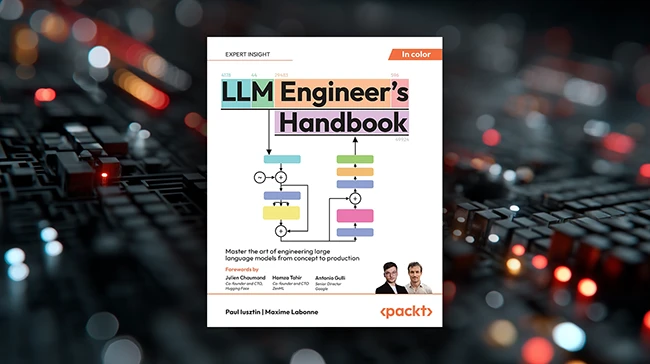
Review: LLM Engineer’s Handbook

LLM Engineer's Handbook review

For all the excitement around LLMs, practical, engineering-focused guidance remains surprisingly hard to find. LLM Engineer’s Handbook aims to fill that gap.

About the authors

Paul Iusztin is a Senior AI Engineer and founder of Decoding ML, a channel for content on learning how to design, code, and deploy production-grade ML.

Maxime Labonne is the Head of Post-Training at Liquid AI, and He holds a Ph.D. in Machine Learning from the Polytechnic Institute of Paris.

Inside the book

The authors walk you through how to design, build, and deploy a production-grade LLM application, specifically an “LLM twin” that writes in your personal style using your digital data. The book frames this twin as a tool to help you build your personal brand, automate social media content, and brainstorm ideas. It’s upfront about the limitations: the model isn’t you, it’s a projection trained on what you’ve written online. That’s the baseline assumption, and it sets the tone for the rest of the book, which is practical, cautious, and focused on real-world tradeoffs.

From there, the authors walk readers through the full stack: data collection, feature pipelines, training and inference pipelines, and system design. One strength is how they separate concerns. Data engineering and ML engineering are treated as distinct, and the book sticks closely to the feature/training/inference (FTI) pipeline architecture throughout. This pattern serves as the backbone for the whole system and will be familiar to engineers who have worked on other ML projects.

Much of the book reads like internal documentation from an AI startup. You’ll find detailed breakdowns of system requirements, tooling considerations, and architectural decisions. For example, instead of assuming access to a massive GPU cluster, the authors design their LLM twin MVP around realistic constraints: a small team, limited compute, and a narrow set of features. That includes crawling personal content from sites like LinkedIn or GitHub, building instruct datasets, populating a vector store for retrieval-augmented generation (RAG), and fine-tuning an open-source model. The result is not just a theoretical walkthrough but a practical roadmap that is grounded in the kinds of compromises most teams experience.

The book assumes readers are already somewhat familiar with LLM concepts, vector databases, and MLOps patterns. It is not a beginner’s guide, and some sections may feel dense if you haven’t worked on ML systems before. There are also places where the moral and privacy implications of LLM twins are acknowledged but not deeply explored.

Still, the book’s core value lies in how it demystifies the nuts and bolts of LLM product development. Rather than chasing benchmarks or open-ended research, it focuses on building something useful, contained, and repeatable. That alone makes it stand out in a market flooded with either high-level AI books for executives or highly academic deep dives.

Who is it for?

If you’re part of an engineering team building with LLMs, or trying to evaluate what such a system involves, LLM Engineer’s Handbook is worth a close read. It won’t answer every question, but it will give you a framework to think through the architecture, tooling, and workflows involved in turning an LLM into a working product.


from Help Net Security https://ift.tt/wQC2F1f

How to fight document fraud with the latest tech tools

In this Help Net Security video, Thomas Berndorfer, CEO of Connecting Software, explores cutting-edge technologies designed to detect and prevent document forgery and digital fraud. He presents four key approaches to verifying document authenticity: IDVT, PKI, AI-based methods, and blockchain, and explains the strengths and limitations of each. Berndhofer highlights blockchain as the most secure option available today and emphasizes the importance of protecting digital information to comply with regulations like GDPR, NIS2, and CCPA. … More

The post How to fight document fraud with the latest tech tools appeared first on Help Net Security.


from Help Net Security https://ift.tt/hofCpuc

Sunday, July 27, 2025

Week in review: Microsoft SharePoint servers under attack, landing your first cybersecurity job

Week in review

Here’s an overview of some of last week’s most interesting news, articles, interviews and videos:

Microsoft pins on-prem SharePoint attacks on Chinese threat actors
As Microsoft continues to update its customer guidance for protecting on-prem SharePoint servers against the latest in-the-wild attacks, more security firms have begun sharing details about the ones they have detected.

How to land your first job in cybersecurity
According to LinkedIn, job applications have surged over 45% in the past year, with 11,000 applications submitted every minute. This flood of applications is making it harder than ever for qualified candidates to stand out.

Storm-2603 spotted deploying ransomware on exploited SharePoint servers
One of the groups that, in the past few weeks, has been exploiting vulnerabilities in on-prem SharePoint installation has been observed deploying Warlock ransomware, Microsoft shared on Wednesday.

World Health Organization CISO on securing global health emergencies
In this Help Net Security interview, Flavio Aggio, CISO at the World Health Organization (WHO), explains how the organization prepares for and responds to cyber threats during global health emergencies.

Sonicwall fixes critical flaw in SMA appliances, urges customers to check for compromise (CVE-2025-40599)
Sonicwall is asking customers running specific Secure Mobile Access (SMA) 100 Series devices to patch a newly uncovered vulnerability (CVE-2025-40599) as soon as possible.

Why outsourcing cybersecurity is rising in the Adriatic region
In this Help Net Security interview, Aleksandar Stančin, Board Member Adriatics, Exclusive Networks, discusses the state of cybersecurity in the Adriatic region.

Microsoft rolls out Windows 11 “quick recovery” feature
With the latest Windows 11 update, Microsoft is saying goodbye to the infamous “Blue Screen of Death” and has enabled the quick machine recovery feature by default for Home users.

Digital sovereignty becomes a matter of resilience for Europe
In this Help Net Security interview, Benjamin Schilz, CEO of Wire, discusses Europe’s push for digital sovereignty through initiatives like Gaia-X and the EU AI Act.

Maximum severity Cisco ISE vulnerabilities exploited by attackers
One or more vulnerabilities affecting Cisco Identity Services Engine (ISE) are being exploited in the wild, Cisco has confirmed by updating the security advisory for the flaws.

Cyber turbulence ahead as airlines strap in for a security crisis
Aircraft systems are getting more connected and ground operations increasingly integrated, and attackers are taking notice. They’re shifting from minor disruptions to targeting critical systems with serious intent.

Critical CrushFTP vulnerability exploited. Have you been targeted? (CVE-2025-54309)
Unknown attackers have exploited a vulnerability (CVE-2025‑54309) in the CrushFTP enterprise file-transfer server solution to gain administrative access to vulnerable deployments.

As AI tools take hold in cybersecurity, entry-level jobs could shrink
A new survey from ISC2 shows that nearly a third of cybersecurity professionals are already using AI security tools, and many others are close behind.

What the law says about your next data breach
In this Help Net Security video, Chad Humphries, Solution Consultant, Networks & Cyber Security at Rockwell Automation, explores how cyber risk quantification is becoming essential for modern organizations.

Phishing campaign targets U.S. Department of Education’s G5 portal
A new phishing campaign is targeting users of the U.S. Department of Education’s G5 portal, a site used by educational institutions and vendors to manage grants and federal education funding.

Are your employees using Chinese GenAI tools at work?
Nearly one in 12 employees are using Chinese-developed generative AI tools at work, and they’re exposing sensitive data in the process.

Ports are getting smarter and more hackable
A new policy brief from NATO’s Cooperative Cyber Defence Centre of Excellence (CCDCOE) warns that critical port infrastructure, responsible for 80 percent of global trade, is increasingly under attack by threat actors tied to Russia, Iran, and China.

Phishing simulations: What works and what doesn’t
Before AI became mainstream, phishing emails often gave themselves away. They were full of grammar mistakes and awkward wording, making them easier to spot. That’s changed. Today’s phishing attacks are much more convincing, often looking just like real messages.

Calico: Open-source solution for Kubernetes networking, security, and observability
Calico is an open-source unified platform that brings together networking, security, and observability for Kubernetes, whether you’re running in the cloud, on-premises, or at the edge.

Cervantes: Open-source, collaborative platform for pentesters and red teams
Cervantes is an open-source collaborative platform built for pentesters and red teams. It offers a centralized workspace to manage projects, clients, vulnerabilities, and reports, all in one place.

Autoswagger: Open-source tool to expose hidden API authorization flaws
Autoswagger is a free, open-source tool that scans OpenAPI-documented APIs for broken authorization vulnerabilities.

Product showcase: iStorage diskAshur PRO3
If you need to keep your files truly safe, the iStorage diskAshur PRO3 is definitely worth a look. It’s easy to use, secure, and feels solid in your hand.

Cybersecurity jobs available right now: July 22, 2025
We’ve scoured the market to bring you a selection of roles that span various skill levels within the cybersecurity field. Check out this weekly selection of cybersecurity jobs available right now.

CISO New York 2025 brings together top cybersecurity leaders
The annual CISO New York summit will be held on September 9, 2025, uniting over 150 senior cybersecurity executives for a full day of insight, strategy, and collaboration at Convene, 601 Lexington Avenue.

New infosec products of the week: July 25, 2025
Here’s a look at the most interesting products from the past week, featuring releases from Akeyless, Bitdefender, Malwarebytes, ManageEngine, PlexTrac, and Seemplicity.


from Help Net Security https://ift.tt/YNs5TzE

Friday, July 25, 2025

A Starter Set of the Best Milwaukee Tools Is 45% Off at Home Depot Right Now

We may earn a commission from links on this page. Deal pricing and availability subject to change after time of publication.

Cordless tools are a must for any home DIY tool kit, allowing you to take on a range of projects, from furniture assembly to small building projects and home repairs, without worrying about being chained to an outlet. I regularly use my own Milwaukee cordless tools for everything from replacing cabinet hardware to trimming my shrubs, and consider them an essential.

But when you're just getting started, you may be reluctant to drop a fortune on a bunch of different tools at once. That's where preassembled tool kits can be a real money-saver. Right now at Home Depot, you can save 45% on an eight-tool combo set of some of Milwaukee's best 18-volt cordless tools, so you can assemble a solid cordless tool set for a price that will leave room in your budget for lumber.

Why I recommend this tool set

For around $700, marked down from nearly $1,300, this set includes all of the foundational tools you’ll need for your home repair and DIY projects—plus a few game-changing bonus tools that will make your life easier. In addition to basic drills, drivers, and saws, this set comes with an oscillating multitool and an angle grinder, which will allow you to use your tools for metalworking and finishing as well as building and repairing. (I used my oscillating multitool to make an emergency drain repair to my 100-year-old craftsman home, and it cut my project time in half.)

The range of tools that this kit includes lets you tackle more challenging projects, and it comes with all the bits and blades you’ll need to get started.

What’s included

The set comes with the essential tools you’ll need for simple DIY projects, and it also has a few of my favorite tools to make your set more versatile. 

The ½-inch drill and the ¼-inch impact driver will allow you to drill holes and drive screws and bolts into wood and light metal. The ½-inch impact nut driver is a high-powered bonus that allows you to drive larger fasteners into tougher, thicker materials, making it useful for vehicle maintenance, like changing tires.

The 6-½-inch circular saw is good for making longer, straight cuts on sheet goods like plywood, but you can also use it to make quick cuts on dimensional lumber like two-by-fours. (To make really straight rips with this saw, you can add a saw guide called a track.) The reciprocating saw is good for making rough cuts and trimming smaller diameter lumber and branches. The oscillating multitool is a versatile cutting and trimming tool that could easily become the hardest working tool in your set—it can make plunge cuts, trim drywall, and cut metal and PVC, and can also be used for buffing and sanding.

The set also includes an angle grinder you can use for cutting metal and grinding down protruding nail and screw tips. You can use this tool if you want to do some light metal work, but it’s also useful for rust removal and tile cutting.

You'll also get a variety of blades for your saw and oscillating multitool that will allow you to cut wood, metal, PVC, and combination materials—all the attachments you'll need are included.

Why I recommend Milwaukee tools

Milwaukee tools have a good reputation for durability, and their batteries are compatible with a wide range of tools. The brand's electric tools were first used in the Ford manufacturing plants as a lighter and more portable version of its existing power drills. Milwaukee began making consumer-level cordless tools in the 1990s, as battery technology improved. Because of Milwaukee’s history of producing contractor-grade tools, they have earned a reputation for quality.

Once you have the Milwaukee 18-volt batteries and charger tin this tool set, you can use the batteries with over 300 other cordless tools. This versatility allows you to build out your DIY tool set as you discover new interests and learn new skills.

I’ve had an 18-volt Milwaukee tool set for over a decade, and the batteries have lasted an average of 10 years, even when I use them outdoors in the rain and heat. Their reputation has definitely proven true for me, and I recommend them to any budding DIY-er.


from Lifehacker https://ift.tt/RGrCgzf