The Latest

Software is a patchwork of third-party components, and keeping tabs on what’s running under the hood has become a challenge. The open-source platform Dependency-Track tackles that problem head-on. Rather than treating software composition as a one-time scan, it continuously monitors every version of every application, giving organizations a live view of risk across their entire portfolio.

Dependency-Track

By leaning on the power of Software Bills of Materials (SBOMs), it delivers insight and precision. Built with developers in mind, its API-first design fits into CI/CD workflows, making security a built-in part of the build process.

Dependency-Track features

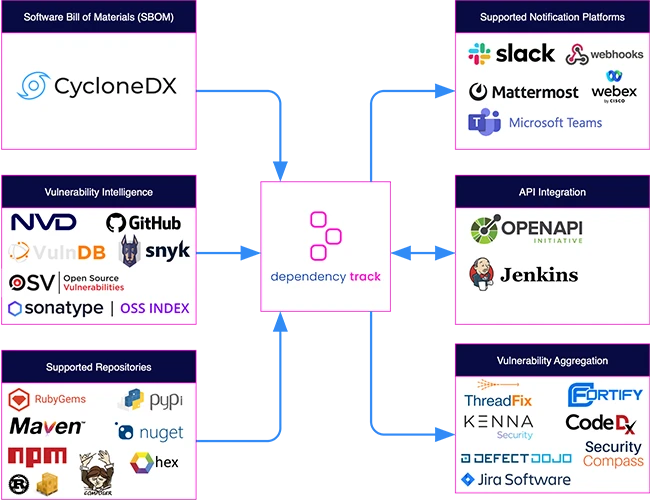
Dependency-Track works seamlessly with CycloneDX, consuming and producing SBOM and VEX formats, ensuring compatibility with supply chain security standards. The platform supports every kind of component imaginable, from applications and libraries to operating systems, containers, firmware, and even hardware, tracking their use across an organization’s portfolio.

IT doesn’t stop at finding known issues. It identifies outdated or modified components, flags license risks, and pulls in vulnerability data from multiple intelligence sources, including NVD, GitHub Advisories, Sonatype OSS Index, Snyk, Trivy, OSV, and VulnDB. By incorporating the Exploit Prediction Scoring System (EPSS), it helps security teams focus their efforts on the vulnerabilities most likely to be exploited.

The platform includes a policy engine to enforce global or per-project rules covering security, license, and operational compliance. It is ecosystem agnostic, supporting popular repositories such as Maven, NPM, PyPI, NuGet, Cargo, and more, while also detecting APIs and external service components to map data flows and trust boundaries.

Dependency-Track’s auditing workflow simplifies triage, and notifications can be tailored through Slack, Microsoft Teams, Jira, email, or webhooks. Metrics are presented clearly across projects and portfolios, and integrations with tools like Kenna Security, Fortify SSC, ThreadFix, and DefectDojo extend its reach into existing workflows.

With an API-first design, OpenAPI documentation, and support for OAuth 2.0, OpenID Connect, LDAP, and API keys, the platform is built for flexibility and scale.

Dependency-Track is available for free on GitHub.

Must read:

Subscribe to the Help Net Security ad-free monthly newsletter to stay informed on the essential open-source cybersecurity tools. Subscribe here!


from Help Net Security https://ift.tt/BiDmslj

The industry is entering a phase where code is being deployed faster than it can be secured, according to OX Security. Findings from the Army of Juniors: The AI Code Security Crisis report show that AI-generated code often appears clean and functional but hides structural flaws that can grow into systemic security risks.

Security teams are overwhelmed

OX analyzed more than 300 software repositories, including 50 that used AI coding tools such as GitHub Copilot, Cursor, or Claude. The researchers found that AI-generated code is not more vulnerable per line than human-written code. The problem is speed.

AI code security risks

Bottlenecks such as code review, debugging, and team-based oversight have been removed. Software that once took months to build can now be completed and deployed in days. That velocity means vulnerable code reaches production before anyone can properly examine or harden it.

Even before AI, security teams were overloaded. The report cites organizations handling an average of more than half a million security alerts at any time. Now the pace of AI-assisted coding is breaking the remaining controls.

The anti-patterns

The study identifies ten “anti-patterns” that appear repeatedly in AI-generated code. These are behaviors that contradict long-established secure engineering practices. Some occur in nearly every project, others less often but still with serious consequences.

Among the most common are:

  • Comments everywhere (90–100%) – AI models fill code with redundant comments that serve as internal markers to navigate context limits. It looks helpful but mainly supports the AI itself, cluttering repositories and revealing dependence on short-term memory rather than true understanding.
  • Avoidance of refactors (80–90%) – Unlike experienced developers who refine and improve code, AI stops at “good enough.” It does not restructure or optimize, leading to growing technical debt.
  • Over-specification (80–90%) – AI tools create narrow solutions that cannot be reused. Each variation requires new code instead of small adjustments, producing fragmented systems that are hard to maintain.
  • By-the-book fixation (80–90%) – AI follows conventions without questioning them. It produces safe, predictable code but rarely finds more efficient or innovative solutions.

Other recurring patterns include a return to monolithic architectures instead of microservices, “vanilla style” coding where AI rebuilds common functionality instead of using proven libraries, inflated unit test coverage with meaningless tests, and phantom bugs where AI adds logic for imaginary edge cases, wasting resources.

Insecure by ignorance

The researchers found that AI code does not necessarily introduce more vulnerabilities like SQL injection or cross-site scripting. The danger is who is using it.

AI tools make it easy for anyone to create software, including non-technical users who lack security knowledge. These users often deploy applications without understanding authentication, data protection, or exposure risks. The report calls this “insecure by dumbness,” meaning functional code with missing safeguards because no one involved knew what was required.

Even experienced developers can fall into this trap. Once an AI-generated application runs, teams assume it is production-ready. Questions about data storage, access control, or internet exposure are skipped in the rush to release features.

Human code review was once the main control, but it cannot scale to match AI’s output. Manual review requires focus and judgment that simply cannot keep up with code generated at machine speed.

“Functional applications can now be built faster than humans can properly evaluate them. Vulnerable systems now reach production at unprecedented speed, and proper code review simply cannot scale to match the new output velocity,” said Eyal Paz, VP of Research at OX Security.

The report recommends embedding security knowledge directly into AI workflows. In practice, that means adding organizational “security instruction sets” to prompts, enforcing architectural constraints, and integrating automated guardrails into development environments. Reactive scanning and post-deployment detection will not be enough when code can be rewritten and redeployed in minutes.

The strategic shift for security leaders

AI will continue to speed up development. Human teams must therefore shift focus toward architecture, orchestration, and threat modeling.

Security leaders should expect their environments to resemble an “army of juniors.” AI agents can produce large volumes of functional code but need senior oversight to ensure that what works is also secure. Without that guidance, organizations risk filling production with fragile systems that expand attack surfaces.

Developers need policies on when and how to use AI tools, what review steps are mandatory, and how security checks fit into automated workflows. Training should emphasize prompt design, contextual awareness, and architectural thinking rather than syntax or debugging alone.


from Help Net Security https://ift.tt/OGWNYqn

Want to see if a remote server is still alive, or trace the path your data takes across the internet? Network Utility had you covered, until Apple removed it.

Network Utility was the go-to macOS app for quick network checks. It gave you a graphical way to run tools like Ping, Traceroute, and Port Scan, no Terminal required. But starting with macOS Big Sur, Apple decided to retire it as part of its system overhaul.

If you’re not a fan of typing commands into Terminal, there’s good news: Neo Network Utility by DEVONtechnologies is a free replacement that brings back the Network Utility feel.

Installation couldn’t be easier. Just drag and drop it into your Applications folder, and you’re ready to go. Neo Network Utility puts all the familiar network diagnostics into user-friendly interface. When you install the app, don’t be confused, both the icon and the title bar say Network Utility, not Neo Network Utility.

I tested version 2.0, which runs on macOS Ventura and later.

Features

The app includes several tabs, each dedicated to a specific network tool. You can copy or export the results from any tab.

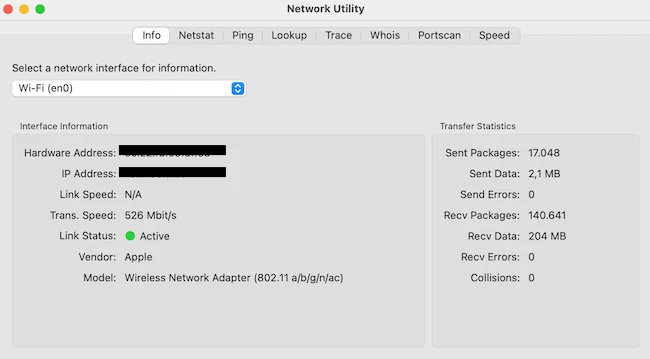
Info tool provides detailed data on each network interface, including its IP and MAC address, link speed, and packet activity.

Neo Network Utility

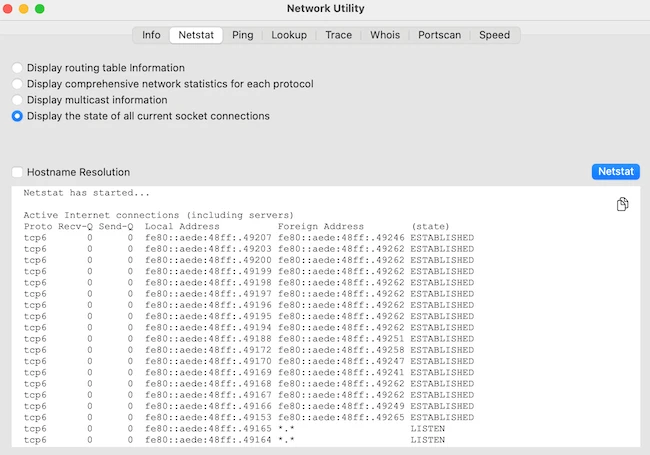
Netstat displays a live view of active network connections, listening ports, and interface activity, perfect for monitoring what your Mac is communicating with in real time.

Neo Network Utility

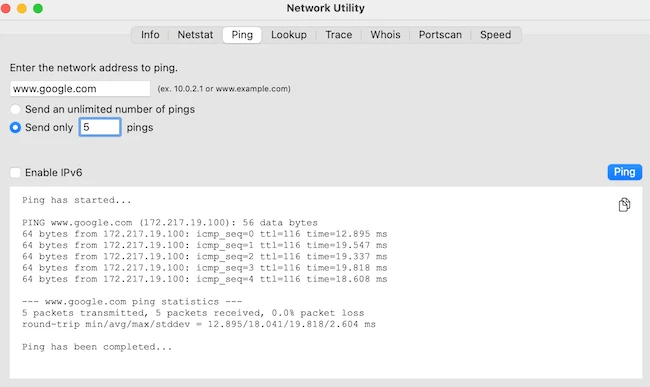
Ping tool checks whether a remote host is reachable and measures the latency between your Mac and that host.

Neo Network Utility

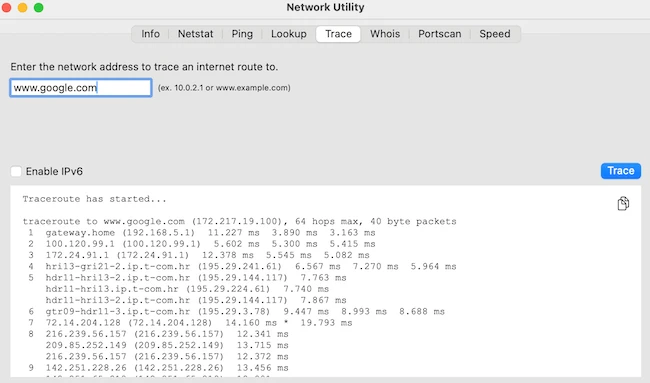
The Trace feature maps the path that data takes across the internet, showing each router hop along the way so you can identify where delays occur.

Neo Network Utility

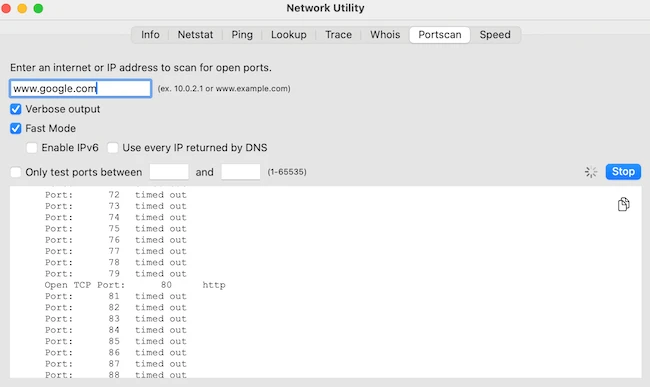
With the Portscan tool, you can examine which network ports are open on a specific IP

Neo Network Utility

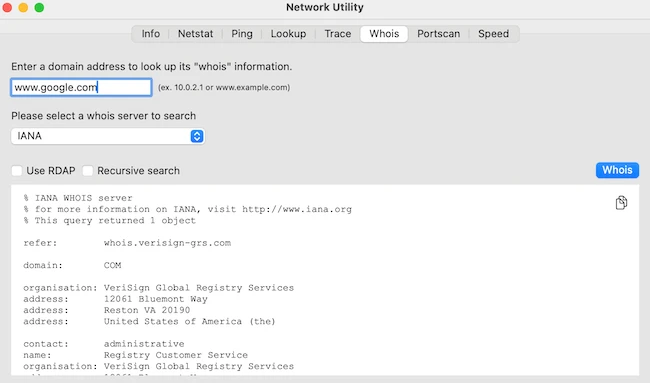
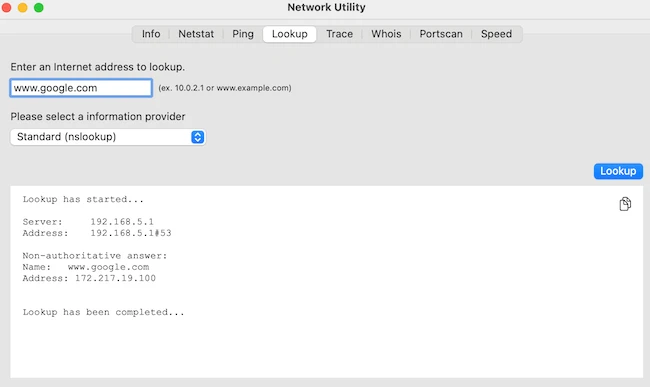
The Whois feature retrieves detailed registration and ownership information about domains, while the Lookup tool helps you resolve domain names to IP addresses and verify DNS functionality.

Neo Network Utility

Neo Network Utility

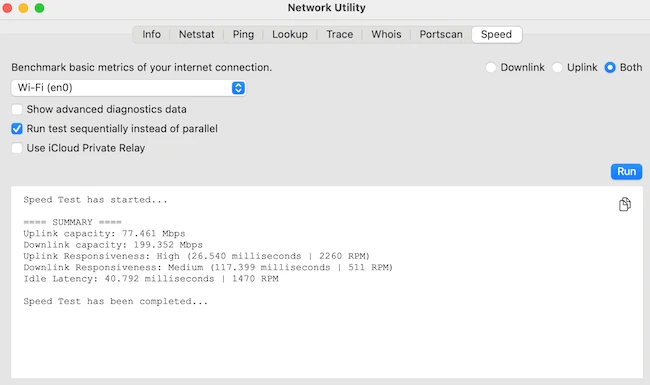
There’s also a built-in Speed Test that measures your current internet upload and download speeds, giving you a quick benchmark of your internet performance.

Neo Network Utility

Final thoughts

Neo Network Utility fills the gap Apple left behind, offering a straightforward way to run network diagnostics without using the command line. It brings back what Mac users still need, a tool for anyone who wants better visibility into their network.


from Help Net Security https://ift.tt/072IUef

Here’s an overview of some of last week’s most interesting news, articles, interviews and videos:

Week in review

Most AI privacy research looks the wrong way
Most research on LLM privacy has focused on the wrong problem, according to a new paper by researchers from Carnegie Mellon University and Northeastern University. The authors argue that while most technical studies target data memorization, the biggest risks come from how LLMs collect, process, and infer information during regular use.

When everything’s connected, everything’s at risk
In this Help Net Security interview, Ken Deitz, CISO at Brown & Brown, discusses how the definition of cyber risk has expanded beyond IT to include IoT, OT, and broader supply chain ecosystems. As organizations connect these assets through cloud and networked systems, the attack surface and dependencies have multiplied.

Google introduces agentic threat intelligence for faster, conversational threat analysis
Security teams spend much of their day pulling data from reports, forums, and feeds, trying to connect clues across multiple sources. Google says that work can now happen through a simple conversation.

Microsoft releases urgent fix for actively exploited WSUS vulnerability (CVE-2025-59287)
Microsoft has released an out-of-band security update that “comprehensively” addresses CVE-2025-59287, a remote code execution vulnerability in the Windows Server Update Services (WSUS) that is reportedly being exploited in the wild.

Microsoft blocks risky file previews in Windows File Explorer
Along with fixing many code-based vulnerabilities, the October 2025 Windows updates also change how File Explorer handles files downloaded from the internet.

Researchers expose large-scale YouTube malware distribution network
Check Point researchers have uncovered, mapped and helped set back a stealthy, large-scale malware distribution operation on YouTube they dubbed the “YouTube Ghost Network.”

Lanscope Endpoint Manager vulnerability exploited in zero-day attacks (CVE-2025-61932)
CVE-2025-61932, an “improper verification of source of a communication channel” vulnerability affecting Lanscope Endpoint Manager, has been exploited as a zero-day since April 2025, the Japan Computer Emergency Response Team Coordination Center (JPCERT/CC) warned on Wednesday.

Critical Adobe Commerce, Magento vulnerability under attack (CVE-2025-54236)
Attackers are trying to exploit CVE-2025-54236, a critical vulnerability affecting Adobe Commerce and Magento Open Source, Sansec researchers have warned.

Attackers target retailers’ gift card systems using cloud-only techniques
A newly uncovered attack campaign mounted by suspected Morocco-based attackers has been hitting global retailers and other businesses issuing gift cards.

Attackers turn trusted OAuth apps into cloud backdoors
Attackers are increasingly abusing internal OAuth-based applications to gain persistent access to cloud environments, Proofpoint researchers warn.

CISA warns of Windows SMB flaw under active exploitation (CVE-2025-33073)
CVE-2025-33073, a Windows SMB Client vulnerability that Microsoft fixed in June 2025, is being exploited by attackers.

Official Xubuntu website compromised to serve malware
The official website for Xubuntu, a community-maintained “flavour” of Ubuntu that ships with the Xfce desktop environment, has been compromised to serve Windows malware instead of the Linux distro.

Hard-coded credentials found in Moxa industrial security appliances, routers (CVE-2025-6950)
Moxa has fixed 5 vulnerabilities in its industrial network security appliances and routers, including a remotely exploitable flaw (CVE-2025-6950) that may result in complete system compromise.

China-linked Salt Typhoon hackers attempt to infiltrate European telco
Salt Typhoon, the China-linked APT group that has a penchant for targeting telecommunications companies, has been spotted trying to sneak into yet another one.

Smart helmet tech points to the future of fighting audio deepfakes
A research team at Texas Tech University tested a method that connects voice verification to the physical act of speaking. The study examines whether jaw and cheek movements can serve as proof of identity.

Faster LLM tool routing comes with new security considerations
Large language models depend on outside tools to perform real-world tasks, but connecting them to those tools often slows them down or causes failures. A new study from the University of Hong Kong proposes a way to fix that.

Your wearable knows your heartbeat, but who else does?
Smartwatches, glucose sensors, and connected drug-monitoring devices are common in care programs. Remote monitoring helps detect changes early and supports personalized treatment and long-term condition management. They give clinicians valuable insight into patient health but also introduce new exposure points. As more care shifts outside hospital walls, sensitive information crosses networks that few organizations can see end to end.

How Lazarus Group used fake job ads to spy on Europe’s drone and defense sector
ESET researchers have uncovered a fresh wave of Operation DreamJob, a long-running campaign linked to North Korea’s Lazarus Group. This latest activity targeted several European defense contractors, including firms deeply involved in drone and UAV development, which may point to a connection with Pyongyang’s push to expand its drone capabilities.

OpenFGA: The open-source engine redefining access control
OpenFGA is an open-source, high-performance, and flexible authorization engine inspired by Google’s Zanzibar system for relationship-based access control. It helps developers model and enforce fine-grained access control in their applications.

For blind people, staying safe online means working around the tools designed to help
Blind and low-vision users face the same password challenges as everyone else, but the tools meant to make security easier often end up getting in the way. A study from the CISPA Helmholtz Center for Information Security and DePaul University found that poor accessibility in password managers can lead people to risky habits such as reusing passwords.

Your smart building isn’t so smart without security
The lights switch on as you walk in. The air adjusts to your presence. Somewhere in the background, a server notes your arrival. It’s the comfort of a smart building, but that comfort might come with a cost.

AI’s split personality: Solving crimes while helping conceal them
What happens when investigators and cybercriminals start using the same technology? AI is now doing both, helping law enforcement trace attacks while also being tested for its ability to conceal them. A new study from the University of Cagliari digs into this double-edged role of AI, mapping out how it’s transforming cybercrime detection and digital forensics, and why that’s exciting and a little alarming.

10 data security companies to watch in 2026
At Help Net Security, we’ve been tracking the cybersecurity world for nearly three decades. Through our Industry News section, we’ve watched countless companies rise, and push the limits of what’s possible in data protection. Some vendors consistently stand out, not just for their products but for how they think about security itself.

Why ex-military professionals are a good fit for cybersecurity
After years of working as part of a team, many military veterans look for work that still carries meaning, challenge, and purpose. Cybersecurity offers a new way to serve and protect on a different battlefield.

Nodepass: Open-source TCP/UDP tunneling solution
When you think of network tunneling, “lightweight” and “enterprise-grade” rarely appear in the same sentence. NodePass, an open-source project, wants to change that. It’s a compact but powerful TCP/UDP tunneling solution built for DevOps teams and system administrators who need to manage complex network environments without wading through configuration files or rigid infrastructure setups.

Life, death, and online identity: What happens to your online accounts after death?
Rapid technological advances have transformed daily life, leaving most of us with digital footprints across email, social media, banking, and more. While we work to protect these accounts from cybercriminals, ensuring loved ones can legally access them after death or incapacity is becoming increasingly important. To address these challenges, the OpenID Foundation is developing a whitepaper and a digital estate planning guide. In this Help Net Security interview, Dean H. Saxe, an OIDF member and digital identity expert, discusses the initiative and its goals.

Why cybersecurity hiring feels so hard right now
In this Help Net Security video, Carol Lee Hobson, CISO at PayNearMe, explores the realities behind the so-called cybersecurity “talent gap.”

3 DevOps security pitfalls and how to stay ahead of them
In this Help Net Security video, Dustin Kirkland, SVP of Engineering at Chainguard, explores three of the most pressing DevOps security issues engineers encounter: unpatched code, legacy systems, and the rise of AI and automation.

Building trust in AI: How to keep humans in control of cybersecurity
In this Help Net Security video, Rekha Shenoy, CEO at BackBox, takes a look at AI in cybersecurity, separating hype from reality. She explains why AI’s true value lies not in replacing human expertise but in strengthening it.

What Microsoft’s 2025 report reveals about the new rules of engagement in cyberdefense
Adversaries are using AI to sharpen attacks, automate operations, and challenge long-standing defenses, according to a new Microsoft report. Researchers describe a year in which criminal and state-backed actors blurred the lines between cybercrime, espionage, and disruption, targeting public and private sectors.

When AI writes code, humans clean up the mess
AI coding tools are reshaping how software is written, tested, and secured. They promise speed, but that speed comes with a price. A new report from Aikido Security shows that most organizations now use AI to write production code, and many have seen new vulnerabilities appear because of it.

Wireshark 4.6.0 brings major updates for packet analysis and decryption
If you’ve ever used Wireshark to dig into network traffic you know how vital even small upgrades can be. With version 4.6.0 the team behind the open-source network protocol analyzer has added a number of features that could change how you analyse traffic, decode protocols and handle captures across platforms.

The next cyber crisis may start in someone else’s supply chain
Organizations are getting better at some aspects of risk management but remain underprepared for the threats reshaping the business landscape, according to a new Riskonnect report. The findings show a growing gap between awareness and action as technology, politics, and global markets shift faster than most companies can adapt.

Gartner predicts the technologies set to transform 2026
Gartner has unveiled its vision for the technologies that will define 2026, spotlighting the innovations and risks that business and IT leaders can’t afford to ignore. The research firm says organizations are entering a period of change, where AI, connectivity, and digital trust will shape how companies compete and operate.

Companies want the benefits of AI without the cyber blowback
51% of European IT and cybersecurity professionals said they expect AI-driven cyber threats and deepfakes to keep them up at night in 2026, according to ISACA.

Inside the messy reality of Microsoft 365 management
Most MSPs agree that Microsoft 365 is now the backbone of business operations, but a Syncro survey shows that complexity, incomplete backups, and reactive security continue to slow their progress in managing it.

Cybersecurity jobs available right now: October 21, 2025
We’ve scoured the market to bring you a selection of roles that span various skill levels within the cybersecurity field. Check out this weekly selection of cybersecurity jobs available right now.

New infosec products of the week: October 24, 2025
Here’s a look at the most interesting products from the past week, featuring releases from Axoflow, Elastic, Illumio, Keycard, Netscout and Rubrik.


from Help Net Security https://ift.tt/cWr47xh

We may earn a commission from links on this page.

I broke one of the biggest rules in the running book and lived to tell about it. Everybody knows you need to replace your running shoes after 300 to 500 miles to avoid injury (or 200 to 400, or whatever running companies are saying these days). Well, I put over 1,000 miles on mine, and I’m not sorry. 

I know it’s been over 1,000 miles because I’ve been tracking my shoes’ mileage in the Garmin Connect app. My watch logs the mileage, and I make sure the credit goes to the appropriate shoe in the app. I carefully ported my shoe miles to and from the Coros app when I switched ecosystems for a bit this past summer. Some of my runs are in a trail shoe, some in a water-resistant shoe, and the rest are in my Nike Downshifters. That four-digit number in the app is real, and I’m sure of it. 

What are these magic shoes? 

Nike Downshifters, side and sole view
Some rips in the upper, but honestly looking pretty good for their age. Credit: Beth Skwarecki

Meet the honored pair. These are the Nike Downshifter 12, in a women’s U.S. size 8.5. I bought them from Amazon in 2024 and paid $66.94 including tax. As I’m writing this, my records show I’ve worn them for 294 activities since June 25 of last year, and they’ve logged a total of 1,024 miles in running workouts. (That’s 6.5 cents per mile, surely a personal record.) For context I run about 20-30 miles most weeks, often but not always in these shoes. 

The Downshifter is a beginner-level running shoe from Nike, but I’m a lifelong runner, not a beginner. I bought my first pair of them out of frustration with other shoes. 

See, I always bought Nike Frees, but Nike kept changing the Free from year to year. Some I liked, some I didn’t. Over time, it seemed like the Frees were getting more expensive every year, and wearing out sooner. Often within a few months of purchase, the foam underfoot would wear unevenly and I’d be running on uncomfortable lumps.

So one day in 2023, I decided I needed to find a shoe that would either last longer, or would be cheap enough that I wouldn’t care. (I ended up with a shoe that checked both boxes.) I browsed sales and bought two pairs, including a purple pair of Downshifter 12’s. I didn’t love them right out of the box, but over the season, they became my favorites. I ran in them all spring and summer, and then ran a half-marathon in them that fall. 

Afterward, I looked up some reviews of the Downshifters, just for fun. One said that the Downshifter is “not the shoe for runners regularly going over four miles.” I laughed. I replaced those purple Downshifters with a new (black) pair in 2024, just because it had been a while and they were probably close to the oft-advised 500-mile limit. That’s what you’re supposed to do, right? 

Why did I put 1,000 miles on these shoes? 

Fate had something different in mind for these new Downshifters. I was curious how long they would last, so I entered them into the gear logging section of my Garmin app. When you add a new shoe, Garmin asks you to set a mileage target so it can let you know when to replace them. I put 500. 

After every run, Garmin would automatically add up my miles. (If I ran in a different pair of shoes, I’d make sure to note that—I’ve put about 200 miles each on two other pairs of shoes within this timeframe.) When I had over 400 miles on the black Downshifters, I ordered a new pair, which still sits untouched in its shoebox to this day. At 500, I ignored the notification to replace my shoes. At 600, “I wonder if I can get these to 1,000” was a dumb thought that entered my head and did not leave. For comparison, here is how they looked at 500 miles:

Downshifters at 500 miles
How they looked at 500 miles. There's still some tread on the heel, and the upper is in OK shape. Credit: Beth Skwarecki

I kept tracking my shoe mileage carefully. This dumb thought is why I was so particular about keeping the miles-per-shoe numbers accurate even when I switched apps. 

The day I hit 1,000 was an anti-climax. I remember them being at 998 miles before joining my husband for an early morning run a few weeks ago. I mentioned to him during the run that the shoes were probably crossing 1,000 miles at that exact moment. “Nice!” he said, and we jogged on. I’ve kept running in them since then. I ran in them today. They feel fine. 

Why I think these shoes lasted so long

I’m no shoe-construction expert, but judging from the feel, it seems there’s just a simple slab of foam under my foot. My previous pairs, the less-durable ones, may have had lighter foams and they usually had more complicated shapes, with cutouts and grooves and such. 

The running shoes on the market are all so different that I don’t think it’s fair to come up with a blanket mileage recommendation that applies to everything. I’ve had running shoes that felt awful to run in after probably less than 100 miles. And then there are others that can go, apparently, 10 times as long. 

These Downshifters are the first pair where I confirmed the exact mileage, but I can think of two other pairs that seemed to last forever: an original 2004 Free 5.0, and a “Free RN Distance” from sometime in the 2010s. I replaced the 2004s when I realized I needed to go a half size bigger to avoid black toenails during marathon training. (No idea of the mileage, but I’d been using them off-and-on for eight years at that point.) I got rid of the RN Distance shoes during a decluttering binge because I hated the color. I soon regretted that decision. Neither pair actually wore out. 

My unscientific opinion is that these shoes lasted so long because they were simple. Just a slab of foam, no fancy shaping, and certainly no high-performance foam technology that might give better dynamics at the cost of longevity. Or maybe I was just lucky. Who knows.

What I think of shoe mileage rules in general

The advice to replace your shoes after 300 to 500 miles originated with a 1985 study that only tested shoes up to 500 miles, no further. It used a machine to simulate the effects of running. After 50 miles, shoes from several manufacturers only had 75% of their initial shock absorption capability. Between 250 and 500 miles, they were down to 60%. (The machine was harder on the shoes than actual runners; after 500 miles, human-worn shoes still had 70% of their initial shock absorption.) 

Surely shoe foams in 2025 are not the same as in 1984. And surely the various shoe models on the market are all different from each other in construction and foam type. But still the 300 to 500 mile rule has persisted, and I have to wonder if shoe makers are designing their shoes to meet the expectation of a 300 to 500 mile lifespan. 

A fascinating article at Runner’s World gets into detail about the different foams that are used these days and what we know about how long they last. Some “super shoes” lose their peak performance after just 100 miles, but even a worn-out super shoe may still perform better than a brand new budget shoe. The article doesn’t make any mileage recommendations, instead landing on advice to “listen to your body, rather than relying on arbitrary yardsticks.” 

I’ve also collected some advice from experienced runners on Reddit on how often they actually switch out their shoes, and as you might expect, the answers are all over the place. There are people who set a hard cap on the mileage they’ll allow a shoe to accrue, and others who go based on vibes. Some people only get 300 miles out of each pair; others say they routinely take theirs into the quadruple digits. 

Ultimately I don’t think much of any rule, and I’m skeptical of the idea that worn-out shoes are a recipe for injury. Running itself is a recipe for injury—I dare you to find an experienced runner who hasn’t dealt with some type of overuse injury, even if they follow every rule in the book. I think some runners use a shoe mileage cap as sort of a good-luck talisman. 

But injury isn’t that predictable, and neither our bodies nor our shoes will always behave in a predictable way over the years. Some shoes agree with our bodies better than others, and some last longer than others. When you find a pair that works for you, you might as well stick with it. 


from Lifehacker https://ift.tt/AE4voMd

The pandemic proved that a lot of us can do our jobs just fine out of the office. Nevertheless, companies continue to push for workers to return to their cubicles—whether in a hybrid arrangement, or five-days-a-week mandatory attendance. In both cases, many companies are looking for ways to hold employees accountable: Since many of our jobs can be done anywhere with an internet connection, if your boss doesn't have eyes on you, it's not always easy to tell where you're working from.

Perhaps your company has rolled out initiatives meant to encourage office attendance. Maybe your boss counts your badge swipes, to ensure that you're meeting your weekly in-office quota, or you are obligated to attend in-person meetings. But it's not just the companies themselves that are working on these kinds of measures. Even Microsoft is trying to make it harder for remote employees to continue working from where they want to.

How Teams will track where you're working from

As spotted by Tom's Guide, Microsoft Teams will roll out an update in December that will have the option to report whether or not you're working from your company's office. The update notes are sparse on details, but include the following: "When users connect to their organization's [wifi], Teams will soon be able to automatically update their work location to reflect the building they're working from. This feature will be off by default. Tenant admins will decide whether to enable it and require end-users to opt-in."

The language suggests that Microsoft intends for this feature to be focused more on helping workers locate fellow employees in large office complexes, and less on snitching on employees working from home when they shouldn't be. That's fair enough: If I worked for a company with multiple buildings on campus, it'd be helpful to know where someone I needed to talk to happened to be working that day.

But let's be real. This feature is also going to be used by companies to track their employees, and ensure that they're working from where they're supposed to be working from. Your boss can take a look at your Teams status at any time, and if it doesn't report you're working from one of the company's buildings, they'll know you're not in the office. No, the feature won't be on by default, but if your company wants to, your IT can switch it on, and require that you enable it on your end as well.

As someone who has worked remotely for most of my professional career, I find the return-to-office mandates generally silly. I understand there are jobs that cannot be done remotely, and aspects of others that are made better by in-person collaboration. But if the vast majority of your work is done on a laptop connected to the internet, it makes no sense for you to be forced to work from an office. It also seems demoralizing to treat employees like children, tracking their whereabouts to ensure they're doing their jobs from a pre-approved location. If you're getting your work done, who cares where that work is happening?


from Lifehacker https://ift.tt/HdAbGrD

Though it brings me no pleasure, it's once again time to discuss the viral apps Tea and TeaOnHer. You may remember them from the summer, when Tea—where women could anonymously rate and discuss men under the pretense of helping each other safely navigate dating—was the target of data breaches that exposed users' personal information. From there, an app called TeaOnHer was launched for men and Tea faced a class action from users who were upset about their private data being easily accessible to hackers. Whether you remember them or not, they're gone now—sort of. Apple has yanked them from the App Store.

The App Store removal of Tea and TeaOnHer

Tea was around for about two years before it unexpectedly went viral in July, which led to at least two distinct data breaches, the second of which occurred when a data expert discovered that not only were some users' pictures stored in an unsecured manner, but some private DMs were, too.

Part of the reason the app went so viral in the first place was that a lot of people were uncomfortable with its premise. It functioned like Yelp, but instead of reviewing businesses, women could review men. The men had no recourse or due process; they couldn't even access the app, let alone respond to anything said about them. (Women were granted access by uploading ID photos or verification selfies and it was the trove of ID photos that was originally hacked and leaked.)

Some people found that unfair and others saw an opportunity to cash in on the discontent. TeaOnHer, an app with the same premise but aimed at men, hit the App Store about two weeks after the Tea hack. The privacy discourse continued, but both apps remained up in the Apple App Store anyway. Until now.

Apple confirmed to TechCrunch that the apps were pulled because they failed to meet the company's requirements for user privacy and content moderation. Sure enough, if you search the apps on the App Store, nothing comes up. Well, except a bunch of imposters looking to make the most of Tea and TOH's absence. Something called "Tea On Her & Him - Overheard" is the second-most-downloaded free app in the Lifestyle category right now.

Can you still use Tea?

Tea hasn't been pulled from Google Play yet, so you can still access it on Android. Moreover, if you already had Tea on your iPhone, it still functions—for now.

When the DM breach was made public over the summer, Tea responded by shutting down DMs and making that clear within the app. Over the course of the news cycle at the time, the app posted public communications to its Instagram page. Within the app and on its social media, there is no mention of the App Store removal, but a rep did email me this: "We are aware that the Tea App has been removed from the App Store and we are working to address Apple's feedback. We know what this app means to our more than six million users and remain deeply committed to our mission of helping women navigate dating with confidence."


from Lifehacker https://ift.tt/xh8ImN1